One-Click Coolify
Coolify VPS Hosting

Features
Every Coolify VPS Plan Includes
Full root access on every plan, which Coolify requires.
2 vCPU, 4 GB ECC RAM and 40 GB NVMe from €14.39/mo — above Coolify's published 2-core, 2 GB, 30 GB minimum.
Self-healing storage: every block lives on three separate drives; failing drives rebuild automatically.
DDoS protection included on every plan.
Unmetered bandwidth under fair-use terms. 2 Gbps per server, upgradable to 10 Gbps.
Automatic HTTPS: point a domain at your server and Coolify's built-in Traefik proxy requests a certificate for it.
From checkout to a running Coolify in three steps
No Docker install or reverse proxy to configure. You pick Coolify at checkout and the open-source install script sets it up.
Pick a plan that fits Coolify
Coolify asks for 2 CPUs, 2 GB of RAM and 30 GB of free space. The Starter tier — 2 vCPU, 4 GB, 40 GB NVMe — clears that with room left for builds. Choose Paris or Montreal.
Choose Coolify at checkout
Under System Image, open the Pre-Installed Applications tab and select Coolify. Apps add €0.00 to the price of the plan.
Open the dashboard and claim it
When the install script finishes, Coolify comes up on port 8000. Register your admin account straight away — on a fresh install, the first visitor to reach it becomes the owner.
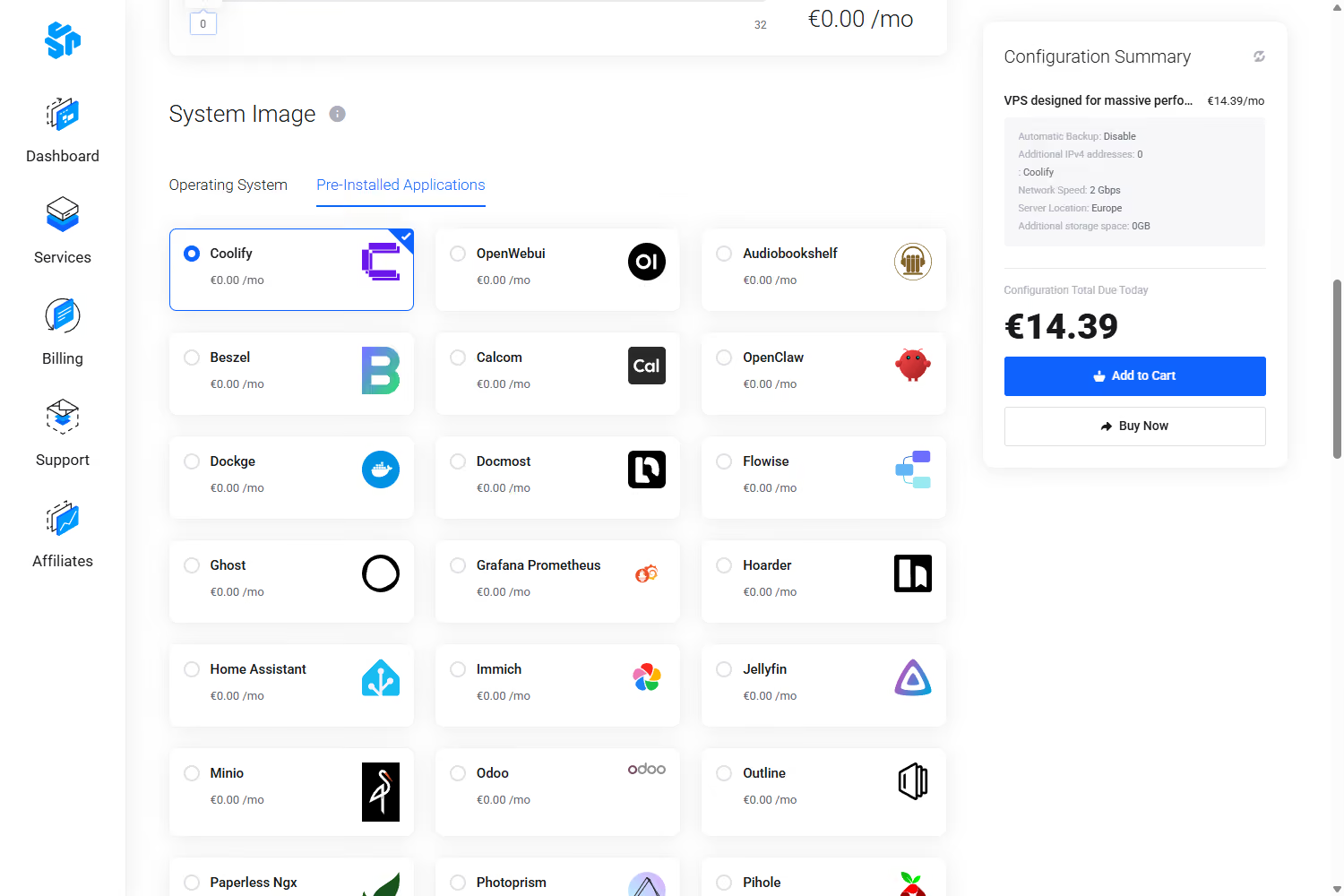
The actual checkout: System Image → Pre-Installed Applications → Coolify, €0.00 on top of the plan.
Use Cases
Why Self-Host Coolify
Your Own PaaS:
Flat Pricing:
Data Residency:
You Own Updates:
Self-Managed, With Support:
Deploy Coolify now
Your Coolify VPS. One Click at Checkout.
Our Edge
What Makes PetroSky Different from a $5 VPS?

Never Overbooked

Verified Performance

Sized For Coolify

DDoS Protection Included
Testimonials
Not marketing promises. Real experiences from teams who build on PetroSky.
%201.svg)

Recently purchased a VPS and ran into some issues, live chat was very helpful, once i was up and running the VPS ran flawlessly. Had a billing issue which was my fault, they could not help enough and in the end offered a full refund without me even requesting it. Can not recommend enough.

These people are truly incredible. They gifted me a free month due to payment processing issues. This only shows how much they care about their customers. Try out their services guys! It's worth it. Also, shout-out to Saad!
The greatest service around ever, PetroSky is the best of them all, so innovative and fast but most importantly, taking care of their customers. I recommend this so much.
I am writing to express my utmost satisfaction with the VPS service I have received from Petrosky.io. From the exceptional support to the blazing fast server speed, my experience has been nothing short of outstanding. The support team's responsiveness has been a game-changer for me. What's even more impressive is the affordability of the services. The combination of high-quality service and budget-friendly pricing is truly commendable.
Really performant and a very reactive support! 200% recommended!

Sizing a VPS for Coolify
Coolify publishes a minimum: 2 CPUs, 2 GB of RAM and 30 GB of free space. That rules out our €6.99 Mini tier, which has one core and 20 GB — so the honest entry point for Coolify is Starter at €14.39/mo. If you build container images on the same box rather than only deploying them, step up to 4 vCPU; builds are the part that spikes.
| Requirement | Coolify minimum | Starter — €14.39/mo | 4 vCPU — €26.39/mo |
|---|---|---|---|
| CPU | 2 cores | 2 vCPU | 4 vCPU |
| RAM | 2 GB | 4 GB ECC | 8 GB ECC |
| Free disk space | 30 GB | 40 GB NVMe | 60 GB NVMe |
| Root access | Required | Full root included | Full root included |
| Where it runs | A server you control | Paris (Equinix) or Montreal | Paris (Equinix) or Montreal |
| Installing Coolify | Manual shell script | One click at checkout — €0.00 | One click at checkout — €0.00 |
Coolify's minimum specification is from coolify.io/docs, July 2026 — check there for current figures. Coolify is free to self-host with no feature restrictions; Coolify Cloud is a paid control plane that still connects to servers you provide. PetroSky is an independent hosting provider and a sponsor of the Coolify open-source project. Coolify is a trademark of its owner.
Starting at €14.39/mo for Coolify
Coolify VPS Plans
vCPU | RAM | NVMe Storage | Price | Ideal Use |
|---|---|---|---|---|
1 vCPU | 2 GB ECC | 20 GB | €6.99/mo | Below Coolify's minimum |
2 vCPU | 4 GB ECC | 40 GB | €14.39/mo | Production workloads |
4 vCPU | 8 GB ECC | 60 GB | €26.39/mo | Multiple apps or heavier load |
8 vCPU | 16 GB ECC | 150 GB | €62.39/mo | Heavy workloads & consolidation |
Four of the nine Pro (Standard CPU) configurations, all with unmetered bandwidth, deployed in Paris (Equinix) or Montreal. Coolify requires at least 2 CPUs, 2 GB of RAM and 30 GB of free space, so the 2 vCPU / 4 GB / 40 GB tier is the smallest that fits. See the full plan matrix. The one-click install adds €0.00. 7-day refund — see the refund policy.
Locations
France and Canada.
More Coming Soon.
Security
Security and Reliability
Pricing
Transparent, Predictable Pricing.
Pro


Pro+ Hybrid
Enterprise
Read the installer before you run it
Every one-click app on PetroSky is installed by an open-source script, published in full on GitHub. The Coolify script installs Docker, runs Coolify's own installer, and — when you supply a domain — points Coolify's built-in Traefik proxy at it so a TLS certificate is issued automatically. It does not preconfigure a firewall: Coolify needs ports 8000, 80, 443, 6001 and 6002 reachable, so set your firewall policy to match once you are in. No hidden agents — the script that provisions your server is one you can read line by line at github.com/PetroSky-Cloud/One-click-app.
Deploying other self-hosted tools? See n8n VPS hosting and OpenClaw VPS hosting, or browse all one-click apps.
FAQ
Frequently Asked Questions
Which PetroSky plan do I need for Coolify?

Coolify's published minimum is 2 CPUs, 2 GB of RAM and 30 GB of free disk space. The smallest PetroSky plan that clears it is 2 vCPU / 4 GB ECC / 40 GB NVMe at €14.39/mo. Our €6.99 tier has one core and 20 GB, so it sits below Coolify's requirement and we don't recommend it for this. If you build container images on the server rather than only deploying prebuilt ones, 4 vCPU / 8 GB / 60 GB at €26.39/mo gives you more headroom.
How do I install Coolify on a PetroSky VPS?
You don't install it by hand. At checkout, under System Image, open the Pre-Installed Applications tab and select Coolify. It adds €0.00 to the plan price, and the open-source install script sets it up on your VPS. You can read the script before you buy at github.com/PetroSky-Cloud/One-click-app.
Does Coolify set up HTTPS automatically?
Yes, once a domain points at your server. Coolify includes a built-in Traefik reverse proxy that requests a TLS certificate for the domain you configure during install. If you don't supply a domain, you reach the dashboard over HTTP on port 8000 and can add a domain and TLS later.
Is the server firewalled after the Coolify install?
No. The Coolify image does not preconfigure a firewall, because Coolify manages its own ports: 8000 for the dashboard, 80 and 443 for the proxy, 6001 and 6002 for websockets and the terminal, plus 22 for SSH. You have full root access, so apply a firewall policy that suits your setup. Register your Coolify admin account as soon as the server is up — on a fresh install, the first visitor to reach the dashboard becomes its owner.
Can I use a PetroSky VPS with Coolify Cloud?
Yes. Coolify Cloud is a paid control plane that still connects to servers you supply, so a PetroSky VPS works there exactly as it does for a self-hosted install. Either way you keep full root access on the machine. If you take the Coolify Cloud route, choose a bare Linux image at checkout instead of the Coolify application image.
Where are the servers located, and can I move mine later?
Equinix Paris (France) and Montreal (Canada). You can move an existing VPS between the two free of charge by opening a support ticket. USA and UK locations are planned, with no announced date.
Deploy Coolify now