Self-Hosted AI Assistant
OpenClaw VPS Hosting


Features
Every OpenClaw VPS Includes
A deny-all UFW firewall on every VPS: incoming traffic blocked by default, SSH only, set up by the installer before OpenClaw starts.fail2ban blocks brute-force logins with 24-hour bans.
- Full root or admin access. Install anything, configure anything. It's your server.
- Self-healing storage: every block lives on three separate drives; failing drives rebuild automatically.
- DDoS protection included on every plan.
- Unmetered bandwidth under fair-use terms. No traffic caps, no overage charges.
- One-click install: Select OpenClaw in the Applications tab at checkout. On Ubuntu 24.04 LTS, the script installs system dependencies, enables the UFW firewall, configures fail2ban, then installs OpenClaw. The script is public — read it on GitHub before you order.
From checkout to a running assistant in three steps
Choose OpenClaw at checkout. Complete onboarding over SSH to connect your model provider and messaging channels, then start the gateway.
Pick a plan and location
Any plan works. Choose Paris or Montreal — your assistant runs around the clock either way.
Choose OpenClaw at checkout
Under System Image, open the Applications tab and select OpenClaw. Apps add €0.00 to the price of the plan.
Connect to a hardened install
On Ubuntu 24.04 LTS, the script sets up system dependencies, a deny-all UFW firewall (SSH only) and fail2ban with 24-hour bans — then installs OpenClaw.
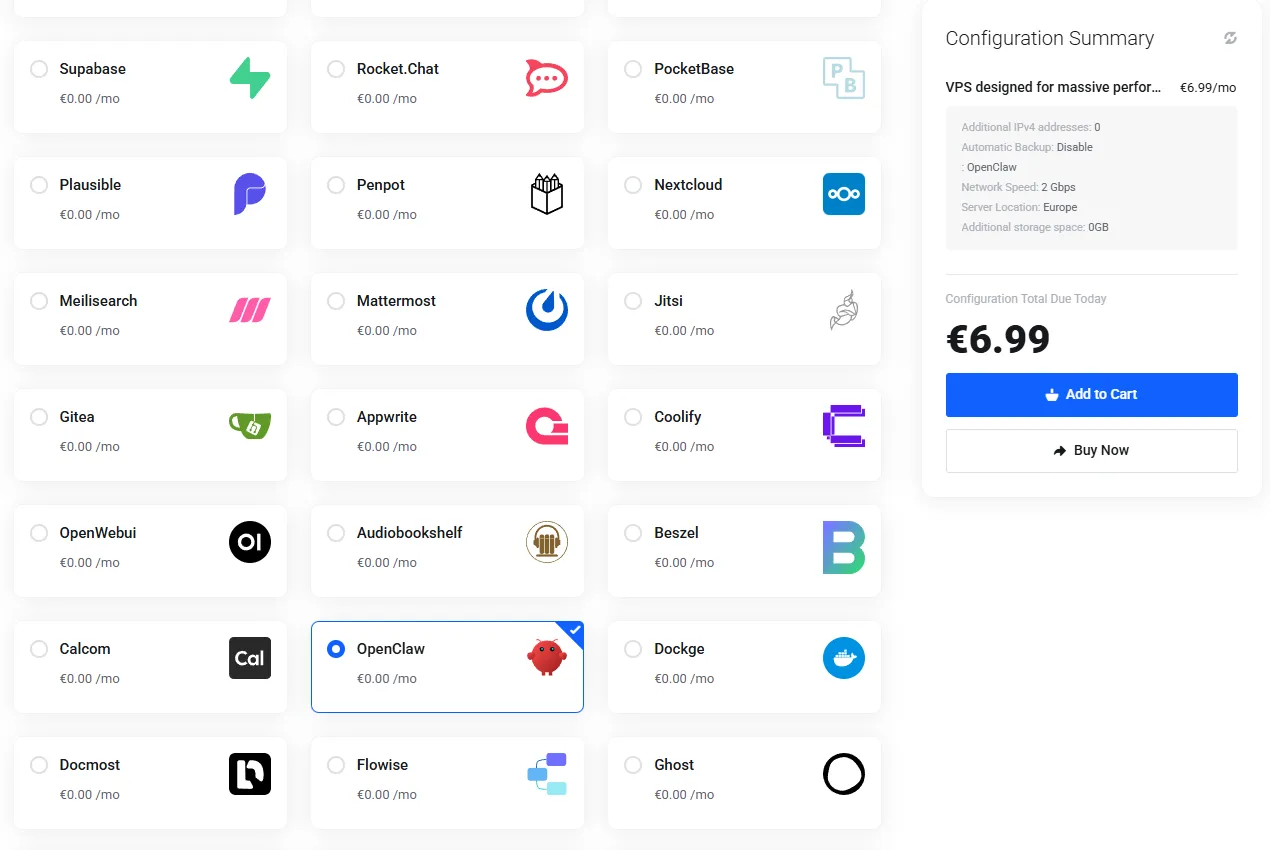
The actual checkout: System Image → Applications → OpenClaw, €0.00 on top of any plan.
Use Cases
Why a VPS and Not Your Laptop
Always-On:
Credential Isolation:
Stable Dedicated IP:
No Throttling:
Yours to Wipe or Rebuild:
Deploy OpenClaw now
Your OpenClaw VPS. One Click at Checkout.
Our Edge
What Makes PetroSky Different from a $5 VPS?

Never Overbooked

Verified Performance

Windows and Linux

DDoS Protection Included
Témoignages
Pas des promesses marketing. De vraies expériences d'équipes qui construisent sur PetroSky.
%201.svg)

Recently purchased a VPS and ran into some issues, live chat was very helpful, once i was up and running the VPS ran flawlessly. Had a billing issue which was my fault, they could not help enough and in the end offered a full refund without me even requesting it. Can not recommend enough.

These people are truly incredible. They gifted me a free month due to payment processing issues. This only shows how much they care about their customers. Try out their services guys! It's worth it. Also, shout-out to Saad!
The greatest service around ever, PetroSky is the best of them all, so innovative and fast but most importantly, taking care of their customers. I recommend this so much.
I am writing to express my utmost satisfaction with the VPS service I have received from Petrosky.io. From the exceptional support to the blazing fast server speed, my experience has been nothing short of outstanding. The support team's responsiveness has been a game-changer for me. What's even more impressive is the affordability of the services. The combination of high-quality service and budget-friendly pricing is truly commendable.
Really performant and a very reactive support! 200% recommended!

Managed OpenClaw hosting vs your own VPS
If you want zero ops, a managed OpenClaw service is a fair choice — someone else runs the box. But an assistant that reads your messages and holds your API keys is exactly the software many people prefer on hardware only they control. That is the trade this table describes.
| Typical managed OpenClaw service | Your own VPS on PetroSky | |
|---|---|---|
| Pricing model | Monthly fee, often plus usage | Flat VPS price, from €6.99/mo |
| Where your API keys live | The provider's platform | Your VM — they never leave your server |
| Root access | No | Full root — run anything alongside the assistant |
| Updates | On the provider's schedule | On yours — update when you choose |
| Wipe and start over | Support request | Rebuild the VM yourself, anytime |
| Setup effort | None | One click at checkout — set up by an open-source script |
OpenClaw is an independent open-source project; PetroSky provides the server and the open-source install script, not the software itself.
Starting at €6.99/mo
OpenClaw VPS Plans
vCPU | RAM | NVMe Storage | Price | Ideal Use |
|---|---|---|---|---|
1 vCPU | 2 GB ECC | 20 GB | €6.99/mo | Entry-level workloads |
2 vCPU | 4 GB ECC | 40 GB | €14.39/mo | Production workloads |
4 vCPU | 8 GB ECC | 60 GB | €26.39/mo | Multiple apps or heavier load |
8 vCPU | 16 GB ECC | 150 GB | €62.39/mo | Heavy workloads & consolidation |
Four of the nine Pro (Standard CPU) configurations — all with unmetered bandwidth, deployed in Paris (Equinix) or Montreal. See the full plan matrix. The one-click install adds €0.00. 7-day refund — see the refund policy.
Locations
France and Canada.
More Coming Soon.
Security
Security and Reliability
Tarifs
Des tarifs transparents et prévisibles.
Pro


Pro+ Hybrid
Enterprise
Read the installer before you run it
The OpenClaw install script is open source and published in full on GitHub. Before the assistant starts, it enables a deny-all UFW firewall with SSH as the only way in, and configures fail2ban to ban brute-force login attempts for 24 hours. Not a promise — a script you can read line by line at github.com/PetroSky-Cloud/One-click-app.
Looking at other one-click installs? n8n VPS hosting covers self-hosted workflow automation and Hermes Agent VPS hosting runs Nous Research's open-source agent — or browse all one-click apps.
FAQ
Frequently Asked Questions
What is OpenClaw?

OpenClaw (formerly Clawdbot) is an open-source, self-hosted personal AI assistant that connects the LLM provider you configure to your messaging apps and tools, and runs around the clock. It is an independent open-source project — PetroSky provides hosting for it.
Are my API keys safe on a VPS?
Your keys live on your own server, readable only by you — PetroSky never handles them. The one-click installer enables a deny-all firewall (SSH only) and fail2ban brute-force protection before OpenClaw starts. Standard SSH hygiene still applies: use key-based login and keep your credentials safe.
Which plan do I need for OpenClaw?
Entry plans handle a personal assistant with light use. If your agent does heavy browser automation or serves several channels at once, pick a plan with more RAM and vCPU — upgrading later takes minutes.
Do you manage or monitor my assistant?
No. Your VPS is self-managed and its contents are yours alone. Support assists 24/7 when something breaks, but nobody at PetroSky operates or reads your assistant.
Can I update OpenClaw myself?
Yes. You have full root access, so you control updates and configuration. The install script is public on GitHub if you want to see how the initial setup was done.
Deploy OpenClaw now